
Transitioning to a new platform can be daunting, and I’ll be honest, I had a moment of 'learning curve' at the start. But once I watched the demo videos, everything clicked. The UI feels incredibly intuitive, especially if you’re already familiar with Figma or Adobe XD; it speaks the same design language. It’s a lifesaver for urgent client changes where payments usually drag on. It perfectly bridges that gap, making it invaluable for building trust with new clients.
Design feedback tool
The design feedback tool that pins every note to the pixel.
Draftli is a design feedback tool for designers and studios. Clients open one link — no login — and leave notes on the exact spot instead of firing vague emails back and forth. When the work is right they approve, and on a paid project you’re paid in the same click.
The problem
Why design feedback breaks down
It’s rarely the feedback that’s the problem — it’s where the feedback lives.
Scattered everywhere
Notes arrive over email, Slack, texts, and call recaps. You stitch them together by hand and hope nothing slipped through the cracks.
Wrong version
A comment lands on last week's export. Nobody is quite sure which round they are looking at, so revisions pile up on the wrong file.
Too vague to action
“Make it pop.” “Not quite there.” Without a pin or any context, you guess what they meant — then guess again on the next round.
Why creators trust Draftli
Stripe handles the money. We never do.
The card is charged by Stripe on your connected account. Draftli never holds, sees, or stores client funds. Statement descriptor is your business name. On the Free plan we deduct a 2% application fee at the transaction; Pro and Ultra are 0%. Read the explainer →
One link does everything.
Send one URL instead of an invoice. Your client reviews the work, leaves notes, approves, and pays in the same flow — no second invoice email, no “just bumping this up.”
Deposits, balance, or 50/50 — your call.
Set a deposit percentage when you create the project. The client pays the deposit through Stripe, reviews unlock, and the balance is charged on approval — also through Stripe, also directly to you. Files stay watermarked until both clear.AIGA’s payment strategies guide lists 50/50 as one of the standard structures ↗
Your client never logs in.
One link. They review on their phone, leave notes, and approve. No sign-up, no app, no password reset.
Watermarked until they pay.
Previews go out stamped. Originals stay in private storage. The watermark drops the moment the payment clears.
Testimonials
Creators who actually use it.
Real quotes from creators using Draftli.

"This is an incredible platform for design proofs. For instance, if someone receives a logo design project and wants a platform that facilitates real-time feedback between the client and the designer, this is the simplest and most minimalist solution. Highly recommended. "

How it works
Clear feedback in three steps
No onboarding for your client, no new tool for you to learn. The whole feedback loop fits in a single link.
1
Share one link
Upload your design and send a single link. Your client needs no account and nothing to install — they just click and start.
2
Collect pinned feedback
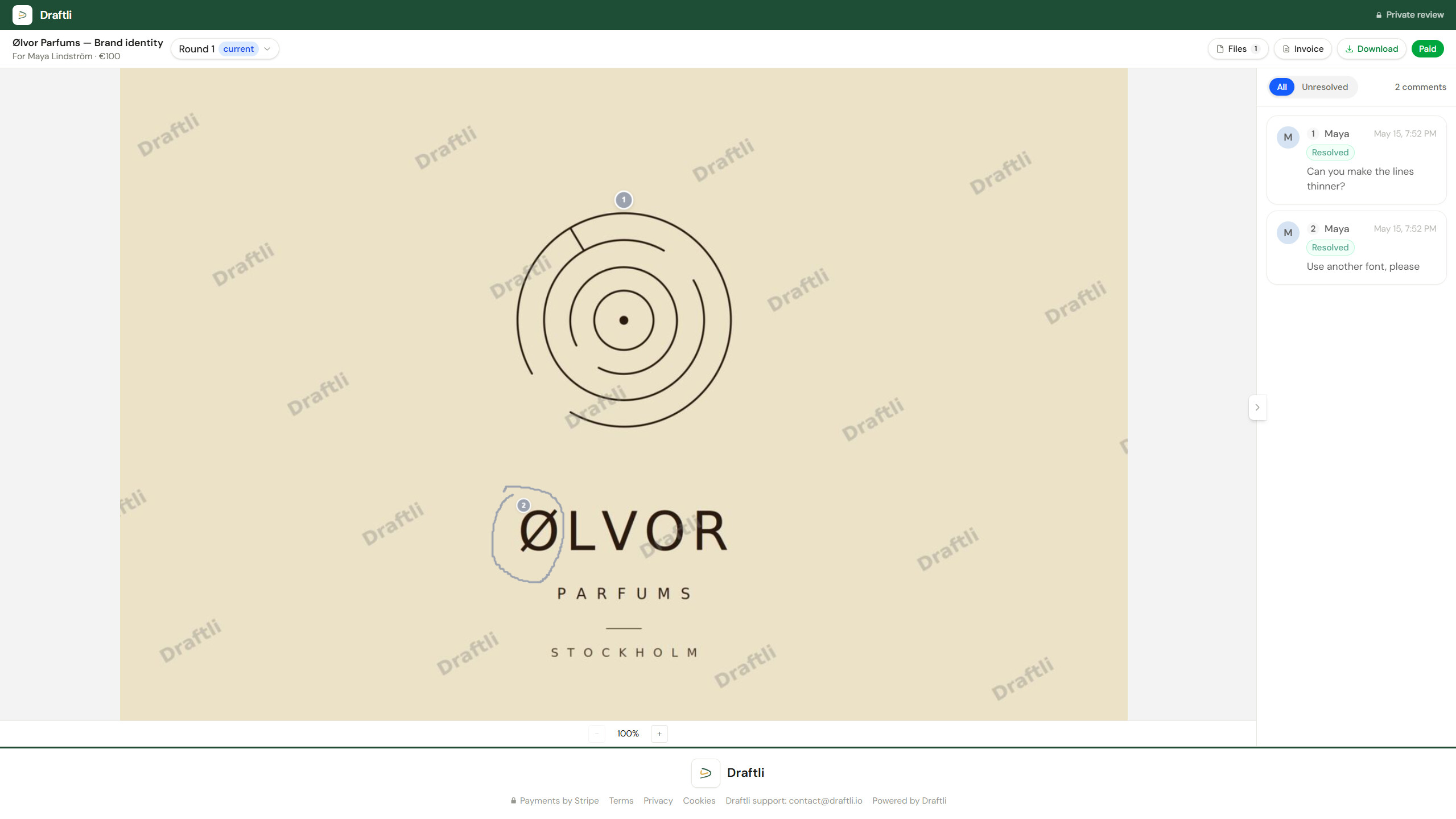
They drop pins on the exact spot and leave notes. Threads resolve in realtime as you work through them, so nothing gets lost.
3
Approve & get paid
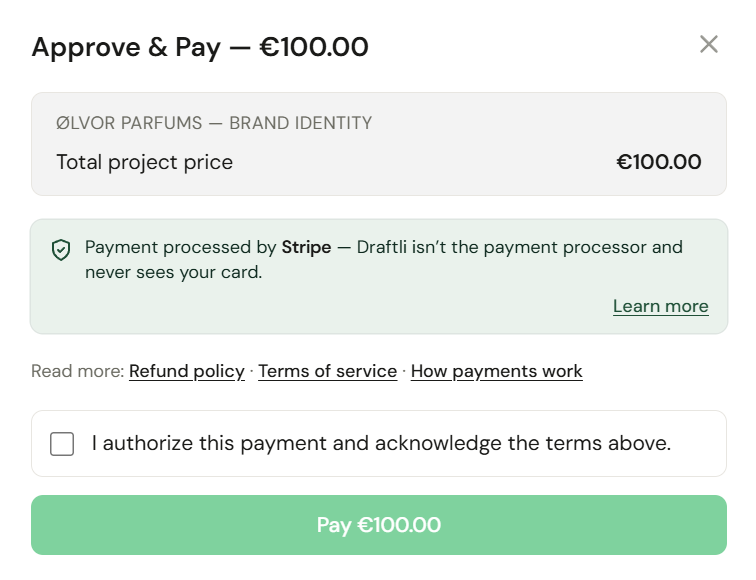
When the design is right, they approve — and on a paid project, that approval is the payment, charged through Stripe on the spot.
Pin-point feedback
Notes that stick to the pixel, not the inbox.
Every comment is tied to a coordinate on the file, so design feedback never gets lost in an email thread or pinned to the wrong version.
- Click any point on the design and the comment stays anchored there for good.
- Multi-page PDFs open page by page, so notes never land on the wrong page.
- Video previews take timestamped comments at the exact frame.
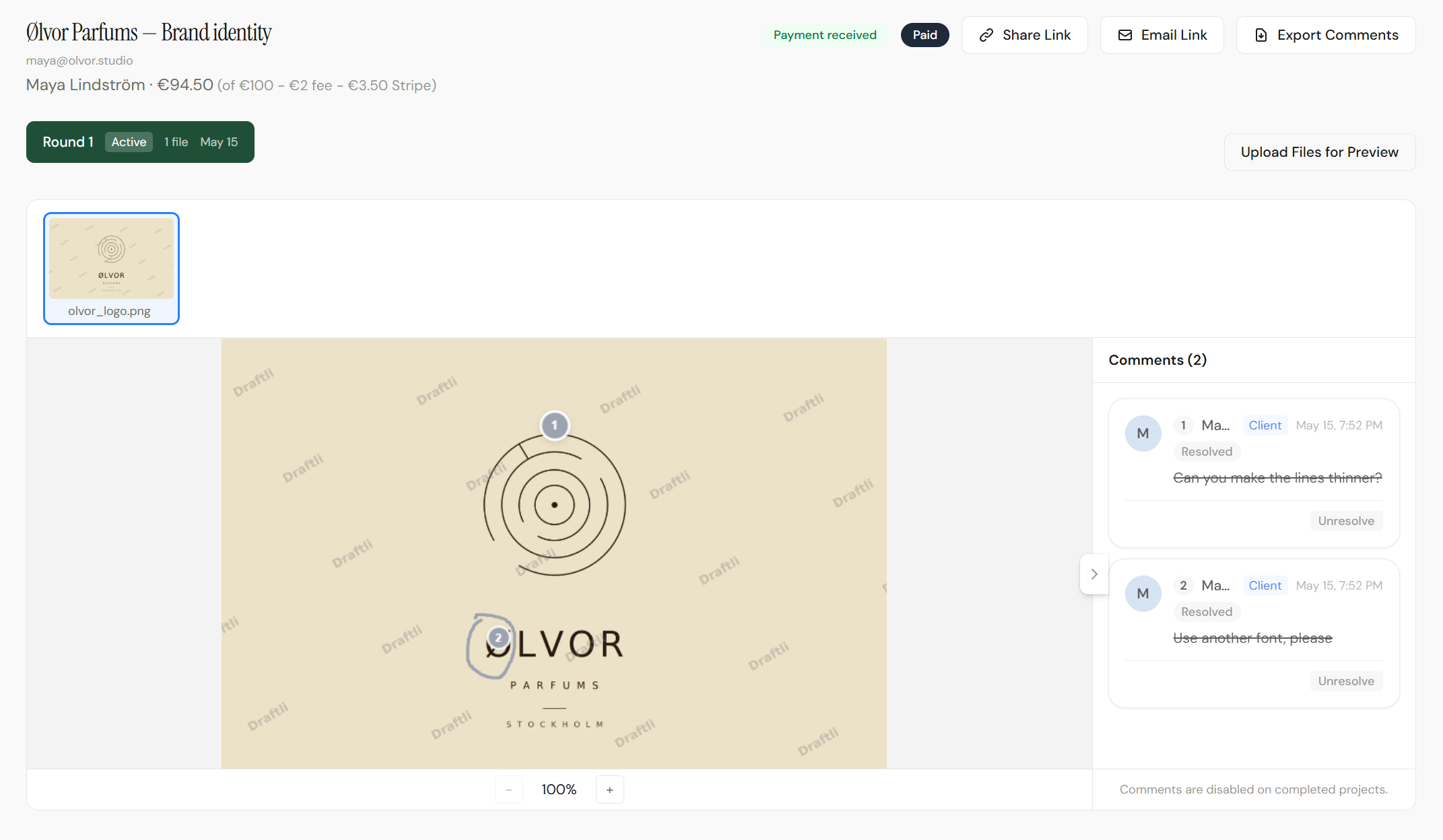
- Mark a thread resolved the moment you fix it; clients see it update live.
Stay on top of it
Feedback you can actually manage
Not a pile of notes to triage across five apps — one thread per file that resolves as you work.
Threaded replies
Reply to a note, ask a question back, and keep the whole exchange attached to the comment instead of buried in a reply-all chain.
Versions in rounds
Every new draft becomes a labeled round that supersedes the last, so a comment is always tied to the version it was left on.
Resolve as you go
Tick off each note as you handle it and watch the open count fall. Both sides always know what's left before sign-off.
Who it's for
Feedback for whatever you deliver
One feedback workflow for every kind of creative — from independent designers to full studios.

Designers
Brand systems, mockups, social sets. Clients mark up the exact element instead of describing it in a paragraph of email.

Video editors
Send a preview cut and get frame-accurate notes. The full-resolution master stays locked until you're paid.

Photographers
Share a watermarked gallery and let clients flag the selects and edits they want, frame by frame.
Studios & agencies
Route every client through one branded feedback link and keep all rounds and comments in one thread.
See it end to end
The whole feedback flow in 40 seconds
Design uploaded. Link shared. Client pins their notes and approves. Money in. The entire loop, condensed.
Beyond feedback
Approval isn’t the finish line. It’s the invoice.
Markup apps, comment threads, and review tools all end the same way: a thumbs-up, and a separate invoice you still have to write and chase. Draftli closes that gap.
The moment a client approves on a paid project, Stripe charges the card on your connected account and your full-resolution originals unlock. The yes and the money are the same click — that’s what approval is payment means.
Feedback in, finished files protected.
Clients see enough to give feedback and approve — never enough to walk away with the finished file before they pay.
Clients only ever see watermarked previews. Every preview is stamped automatically the moment you upload, and the watermark drops only when payment clears.
Your originals never leave private storage. Full-resolution files sit in a separate bucket with no public access. Previews and originals are never in the same place.
Download links are signed and expire. Every download URL is generated fresh per request and times out within hours — a leaked link goes stale, it doesn’t stay open.
Your client never logs in. Feedback happens through one signed share link, not an account — nothing for a client to have phished or reused.
Card data is handled by Stripe, not Draftli. Stripe is PCI-DSS Level 1 certified, the highest level the standard defines. Draftli’s database has no card field.
Want the detail your client asks for?
Read how payments work →Design feedback tool, answered.
The questions creators ask before they send their first feedback link. More on why creators choose Draftli and on pricing.
What is a design feedback tool?
A design feedback tool lets clients comment directly on your work in the browser instead of replying to emails or marking up screenshots. In Draftli, clients open one link, drop pins on the exact spot, and leave notes tied to that point on the file — and when they approve, payment happens in the same flow.
How do I get clearer feedback from clients?
Vague notes usually come from vague tools — an email can't point at anything. Because every Draftli comment is pinned to a coordinate on the file, 'make this bigger' becomes a note attached to the exact element. Clients get specific because the tool makes specificity the easy path.
Do clients need an account to leave feedback?
No. Clients open the share link and comment without signing up, installing an app, or creating a password. Removing that one step is the difference between getting feedback in two minutes and chasing it for a week.
Can my whole team or several clients leave feedback?
Yes. Anyone with the link can drop pins and add comments, and every note is labeled by author. You see who asked for what in one place, instead of stitching together separate email replies from different people.
How do I keep feedback tied to the right version?
Each new draft supersedes the last as a labeled round. A comment always stays attached to the version it was left on, so you never act on a note that referred to an old export.
What file types can clients give feedback on?
Images (PNG, JPG, WebP), multi-page PDFs rendered page by page so any page can be marked up, and video (MP4, MOV) with timestamped comments. Files can be up to 500 MB on the Free plan and 2 GB on Pro and Ultra.
How is this different from comments in Figma or email?
Figma comments only work if your client is already in Figma; email scatters feedback across replies and loses track of the version. Draftli gives any client a no-login link to comment on any file type — and uniquely, it turns their approval into payment instead of a separate invoice.
Do clients pay through the same tool?
Yes, and that is what sets Draftli apart from a plain design feedback tool. On a paid project, approving opens Stripe Checkout on your connected account and the charge happens immediately — no invoice to send, and your originals unlock the moment it clears.